Bolted Carabiner & Drill Logo

BOLTED

ROCK TOOLS

Precision Topos. Safer Crags.
100% Free.

Draw vector topos over real cliff photos, organize personal and official route catalogs, and report hazardous hardware with true offline reliability.

On Android? Bolted is in Early Access. Tap Google Play and we’ll walk you through a quick 1-minute setup.

100% Free Forever Zero Ads or Paywalls Full Offline Support
Precision Visual Authoring

Draw Clean Topos on Real Cliff Photos

Sketch route paths directly on high-resolution wall photos with a GPU-accelerated vector canvas that stays fast and responsive when zooming in on small cruxes.
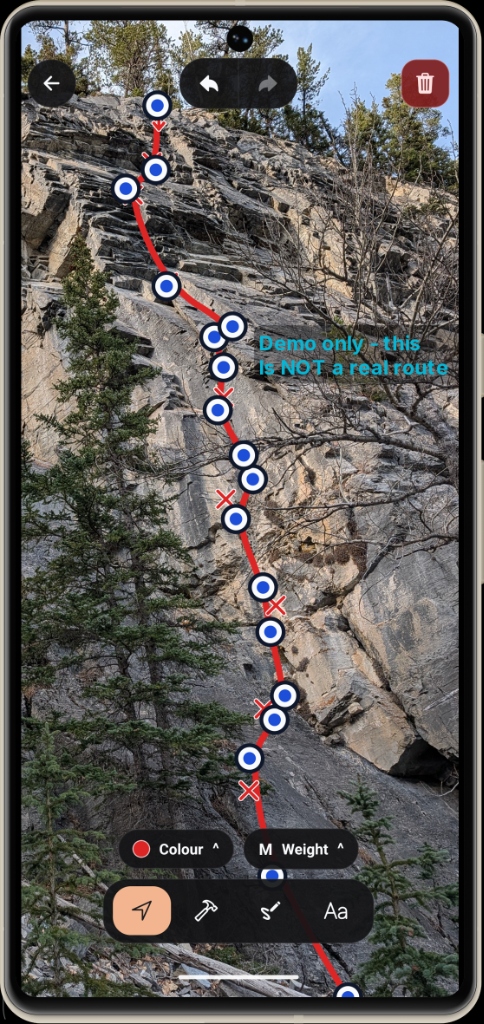
  • Smart Point Sampling: Sketch lines freehand with automatic touch-jitter filtering that creates clean, spaced control handles.
  • Control Point Handles: Drag individual vertices to perfectly match cruxes, clipping stances, and natural rock features.
  • Climbing Stamps: Place dedicated markers for bolts, belay anchors, and directional rappel stations with a single tap.
  • Calibrated Palettes & Text: Choose from 10 rock-contrast swatches, 3 line weights, and multiline text callouts with full undo/redo safety.
Bolted Topo Editor interface on mobile
Dual Catalog Architecture

Organize Local Crags & Connected Catalogs

Seamlessly combine your own locally authored crags with official databases like TABVAR without cluttering your phone with unwanted data.
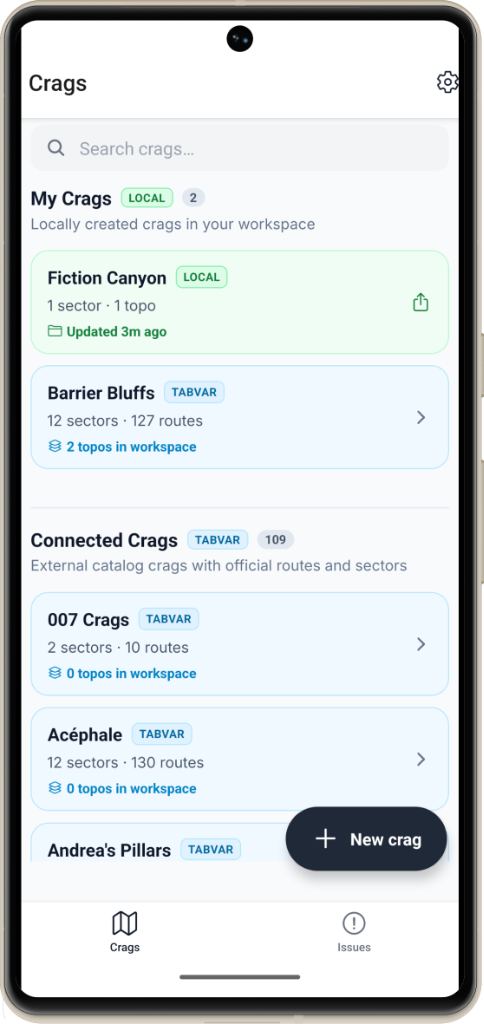
  • My Crags (Local Workspace): Build and document new crags with 1-tap export, sector organization, and instant topo updates.
  • Connected Crags (TABVAR): Access over 100 official crags with verified sectors, route counts, and grades.
  • Workspace Topo Tracking: Quickly identify how many topos are in your workspace and spot unmapped lines ready for photos.
  • Instant Crag Search: Filter across all sectors and routes in seconds, even while standing offline at the base of the wall.
Crags catalog screen showing My Crags and Connected TABVAR crags
100% Offline Crag Safety

Report Hardware Hazards Directly at the Crag

Deep canyons and remote cliffs have zero cellular reception. Bolted runs an embedded SQLite database directly on your phone so you never lose a safety report.
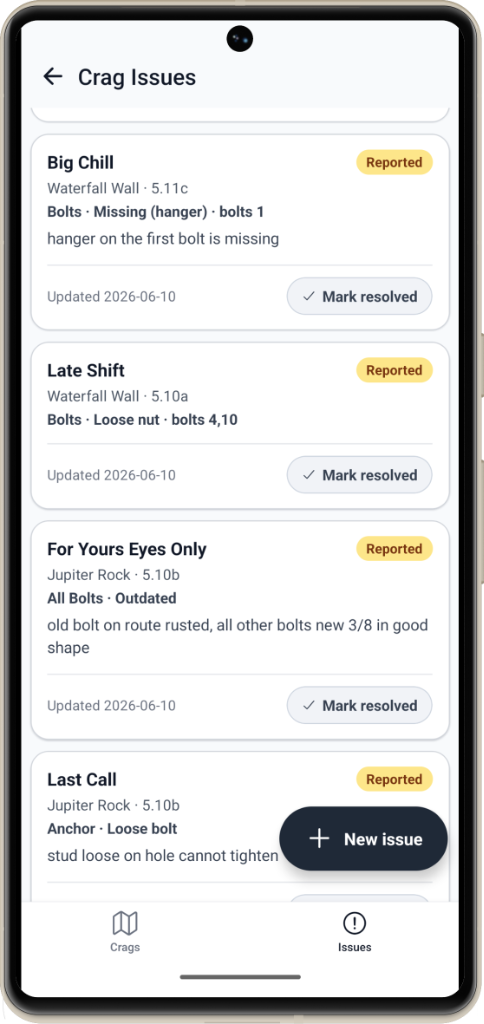
  • Granular Hardware Breakdown: Report missing hangers, loose nuts, outdated rusted hardware, spinning glue-ins, or loose anchor studs.
  • Community Lifecycle: Track reports from Reported to Mark resolved as route maintainers install new hardware.
  • Automatic Outbox Sync: Photos and issue logs queue locally and sync cleanly in idempotent batches when back in signal.
Crag Issues list showing reported bolt and anchor hazards with Mark resolved buttons
Free on iPhone & Android

Get Bolted

No subscriptions, no ads, no paywalls. Pick your phone below.

Available now

iPhone & iPad

Install straight from the App Store in one tap.

  • One tap to install
  • Automatic updates
Download on the App Store
Early Access

Android

Google requires early testers to be approved first. We’ll walk you through it.

  • 3 quick steps, about 1 minute
  • No emails, no spam
Get Android Early Access
Community Driven

Made by a TABVAR Volunteer for climbers and route developers everywhere

Bolted was created by a volunteer with TABVAR (The Association of Bow Valley Rockclimbers), the non-profit organization responsible for replacing aging bolts and upgrading fixed climbing hardware across the Canadian Rockies.

The app is and always will be 100% free. No subscriptions, no ads, and no paywalls. It exists solely to give route developers precision tools and give climbers a direct line to keep crags safe.

Want to say thanks? The best way to support this free app is by donating directly to TABVAR to fund replacement bolts and hardware across our climbing areas.

Interested in integrating your crag catalog, guidebook, or local climbing organization with Bolted? Get in touch at integrations@boltedrock.app.

Android Early Access

Get Bolted on Android

Bolted is in Early Access on Android. Until public launch, Google only lets approved testers download it, so there’s a quick one-time setup. It takes about a minute.

Step 1 of 3

  1. Join the tester list

    Opens Google Groups. Tap Join group.

    Use the same Google account as your phone’s Play Store.

    Join the tester list
  2. Accept your tester invite

    Opens Google Play’s testing page. Tap Become a tester.

    Become a tester
  3. Install from Google Play

    Now unlocked. Install it like any other app.

    Open Google Play
Having trouble?
Google Play says “Item not found”
You’re probably signed into a different Google account. Check that your Play Store profile matches the account you used in step 1. New testers can also take a few minutes to show up, so try again shortly.
I’m on a computer
That works. Finish steps 1 and 2 here, then open the Play Store on your phone, or install remotely from the Google Play website.
How do I leave?
Any time: tap Leave the program on the tester page, or leave the group in Google Groups.